Posts

ServletConfig and ServletContext

Both ServletConfig and ServletContext are configuration objects used by servlet container to initialize various init parameters for a web application. However they differ in terms of the scope and availability of init parameters defined by both of them ServletConfig The parameter scope is limited to the scope of the servlet in which the parameter is defined. For example, shopping cart of a user is specific to a particular user so servletconfig params can be used. One ServletConfig per servlet It is used to pass deploy-time info to servlet and configured in the deployment descriptor file. It is used to access ServletContext It is within the Servlet element in Deployment descriptor. It is accessed by using getServletConfig().getInitParameter("myname"); It is available only to the servlet in which init-param is configured. <servlet>  <display-name>InitParamTest</display-name>  <servlet-name>InitParamTest</servlet-name>  ...

JDBC PROGRAMS

INDEX JDBC Connecting to Oracle 11g Database

JAVA SERVLET PROGRAMS

1) Configuring Tomcat7 with Eclipse Juno

Configuring Tomcat 7 with Eclipse Juno

Image
1)First download  the latest Eclipse IDE for Java EE Developers and Tomcat 7 Note:You just need to extract both Eclipse and Apache Tomcat 2)Start Eclipse! The first thing that Eclipse will do is ask you to create a new Workspace. Select a Folder which you want to be your workspace.All your project will be created here 3) Make sure you are in Java EE perspective : Go to Window->Open Perspective-> Java EE   4)Add Server: In“Servers” area, right click -> New -> Server. 5)Here you will see list of servers that can be configured in the installed Eclipse IDE version. You will find Tomcat v7.0 Server under “Apache” folder as shown below. Select “Tomcat v7.0 Server” and click Next. 6) Configuring Apache Tomcat installation location 7)Select the Tomcat Root folder which has bin folder and click Next. There are no resources to be configured and hence click Finish. 8)The configured Apache Tomcat Server will be displayed in the “S...

Servlet Lifecycle

Image
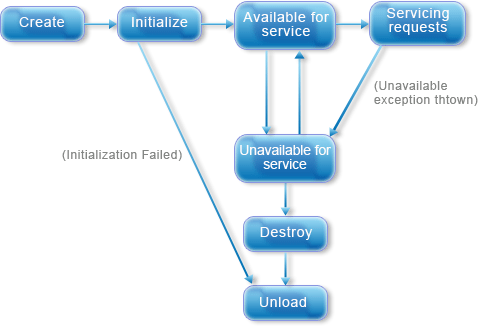
Servlet Life Cycle The life cycle of the servlet is controlled by the S ervlet container . Basically there are three methods in servlet lyfe cycle which servlet calls 1.      init()-  This method is called to initialize  a servlet. In servlet 2.4 specification if you do not call init() method in your servlet program then the container call it implicitly. 2.      service()-  This method is called to execute the business logic written in servlet. This is the method which you must have to override, when you are writing a servlet. 3.      destroy()-  This method is called to finalize the servlet. Note- The servlet call init() and destroy() method only once called during its life cycle. During initialization stage of the Servlet  life cycle , the web container initializes the Servlet instance by calling the  init()  method, passing an object implement...

Servlet Types

Image
There are mainly two types of servlets -    Generic Servlet -  Generic servlet is protocol independent servlet. It implements the Servlet and ServletConfig interface. It may be directly extended by the servlet. Writing a servlet in in GenericServlet is very easy. It has only init() and destroy() method of ServletConfig interface in its life cycle. It also implements the log method of ServletContext interface.   Http Servlet -  HttpServlet is HTTP (Hyper Text Transfer Protocol ) specific servlet. It provides an abstract class HttpServlet for the developers for extend to create there  own HTTP specific servlets. The sub class of HttpServlet must overwrite at least one method given below-   doGet(),doPost(),doTrace(),doDelete(),init(),destroy(),getServiceInfo(). There is no need to overrride service() method. All the servlet either Generic Servlet or Http Servlet passes there config parameter to the Servlet interface. Servlet Heirarchy ...

The Deployment Descriptor: web.xml

Image
Before I explain what a deployment descriptor is, we should first understand the web application directory structure WEB APPLICATION DIRECTORY STRUCTURE: A Web application contains a structure hierarchy of directories and files in a standard layout. Such a hierarchy can be accessed in its "unpacked" form, where each directory and file exists in the filesystem separately(This  format is more useful during development) , or in its "packed" WAR file(This format is used  when you distribute your application to be installed) . Any Web Application that is to be deployed in Tomcat has to conform to this directory structure. The format of the structure can be seen in the figure below: Web Application Directory Structure Application Root Directory   - This is the root directory of the Web Application. The name of this directory is named by the developer - for example the default context we created for this module was called "stud...